Everything I got wrong planning a $5.5k AI homelab
Three planning mistakes, one invisible GPU, and seven months of running a 64GB-VRAM box that ended up doing a completely different job than the one I built it for.
The cloud rate-limit notification arrived at 2am. Third time that week. I was trying to run inference tests on a 30B-parameter model, and the pattern had become familiar: wait for instance availability, watch the meter run, get throttled mid-experiment, lose the thread. I wanted to understand models - what fits where, how quantization degrades reasoning, what fine-tuning actually costs - and renting compute by the hour turns every question into a billing decision.
So I built a homelab: 4× RTX 5060 Ti 16GB (64GB VRAM total), a Ryzen 9 9950X, 128GB of DDR5, on an open mining frame. Final cost: $5,638.79. It works, and it earns its keep daily.
Almost nothing about it went the way I planned. This post is the mistake log: three planning errors, a build-day tax, and the seven months of operation that the plan never saw coming, including an OS that refused to admit one of my GPUs existed. If you’re planning a build, these are the mistakes you can skip.
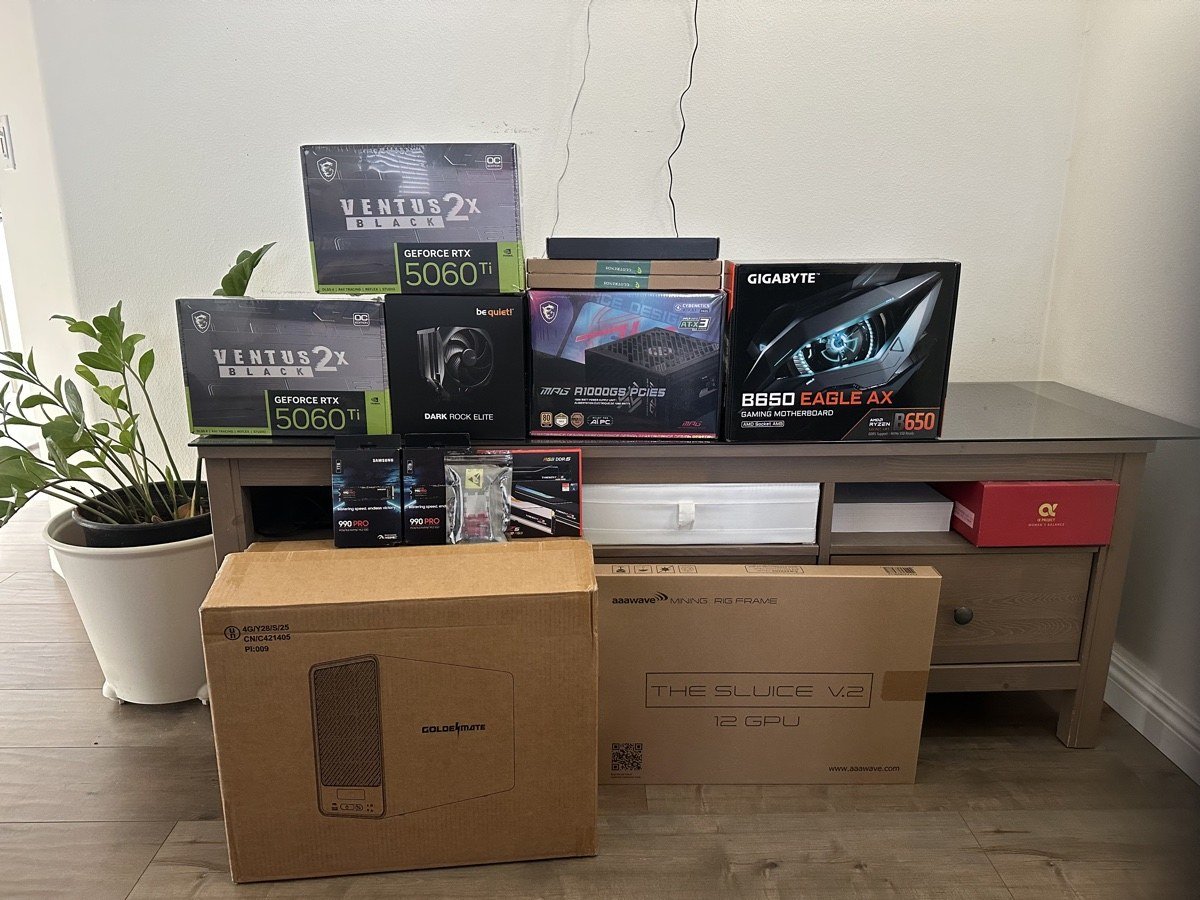
Mistake 1: the $2,500 unified-memory trap
My first plan wasn’t this machine at all. It was a Framework Desktop with 128GB of unified memory for $2,500. On paper it looked ideal: enough memory to load a 70B model, compact, no assembly required.
The problem is that “fits in memory” and “runs at usable speed” are different claims. Unified memory shares bandwidth between CPU and GPU; for LLM inference, that’s dramatically slower than dedicated VRAM on a real memory bus. A 30B model would have loaded fine and generated tokens at a pace that made the cloud rate limits look generous.
I caught this one before spending the money. Hold the thought about unified memory, though - it comes back at the end of this post, from the other direction.
Mistake 2: the RTX 3090 that didn’t physically fit
Plan two: one used RTX 3090 24GB ($960) for large models, plus two RTX 5060 Ti 16GB cards for parallel work. 56GB VRAM, $1,882. I checked PCIe lanes, power budget, PSU connectors, motherboard compatibility.
I did not check whether the card would fit. The 3090 is 310mm long and three slots wide; the open-frame chassis spaces its mounting positions for two-slot cards. On build day, it simply didn’t go in.
The forced pivot turned out better than the plan: 4× RTX 5060 Ti 16GB. More VRAM (64GB vs 56GB), slightly cheaper ($1,844 vs $1,882), lower power (660W vs 790W), all new hardware, and four identical cards instead of a mixed configuration. I’d like to claim this was foresight. It was chassis geometry.
| Planned (mixed) | Actual (uniform) | |
|---|---|---|
| GPUs | 1× 3090 + 2× 5060 Ti | 4× 5060 Ti 16GB |
| VRAM | 56GB | 64GB |
| GPU cost | $1,882 | $1,844 |
| GPU power | 790W | 660W |
Mistake 3: counting PCIe lanes instead of reading the slot map
This is the one that followed me into production.
The 9950X has 28 usable PCIe lanes, which sounds like plenty for four GPUs. What I didn’t check is how my B650 motherboard distributes them: slot 1 gets x16, and slots 2-4 get x1 each. That’s a 16× bandwidth gap between the primary GPU and everything else.
At planning time I talked myself into this being acceptable: I intended to run independent models on each card, so inter-GPU bandwidth wouldn’t matter, and x1 would only slow model loading. That reasoning was half right and it still failed, because the failure mode wasn’t bandwidth.
The OS never found the fourth GPU. The last x1 slot simply didn’t enumerate. Three cards visible, one card drawing power and doing nothing, and no amount of reseating changed it.
The fix was a $60.34 bifurcation riser: a PCIe 4.0 x16-to-x8/x8 splitter card in slot 1. Final topology: two GPUs at x8 on the riser, two GPUs at x1 on the board. All four cards visible, and the two x8 cards now have vastly better interconnect than the original plan ever did.
Two lessons, both cheap to learn in advance and expensive to learn on build day. First, read the motherboard manual’s lane-distribution table, not the CPU’s lane count: “28 lanes” and “x16/x1/x1/x1” are describing the same board. Second, if you’re planning multi-GPU on a desktop board, check bifurcation support before you need it. For real GPU-to-GPU work you want x8 per card minimum, which on consumer platforms means either a bifurcation riser and a board that supports it, or a workstation platform.
Does a big model split across all four cards work? Functionally, yes - I’ve loaded one model across all four GPUs. But the x1 links mean I’d expect token throughput to bottleneck hard on inter-GPU transfers, and I’ve only benchmarked multi-GPU serving on the two x8 cards so far. Honest status: works, unproven at 4-way, physics is not optimistic.
The build-day tax
Smaller items, same theme. Everything that bit me was checkable in advance:
The board shipped with a BIOS that predated Zen 5 and 64GB DIMMs, so first boot was fans, lights, and a DRAM debug LED. Q-Flash Plus (BIOS update with no working CPU) fixed it in an hour, but only because the board supported it: check that feature exists before you buy a new-generation CPU on an old-stock board.
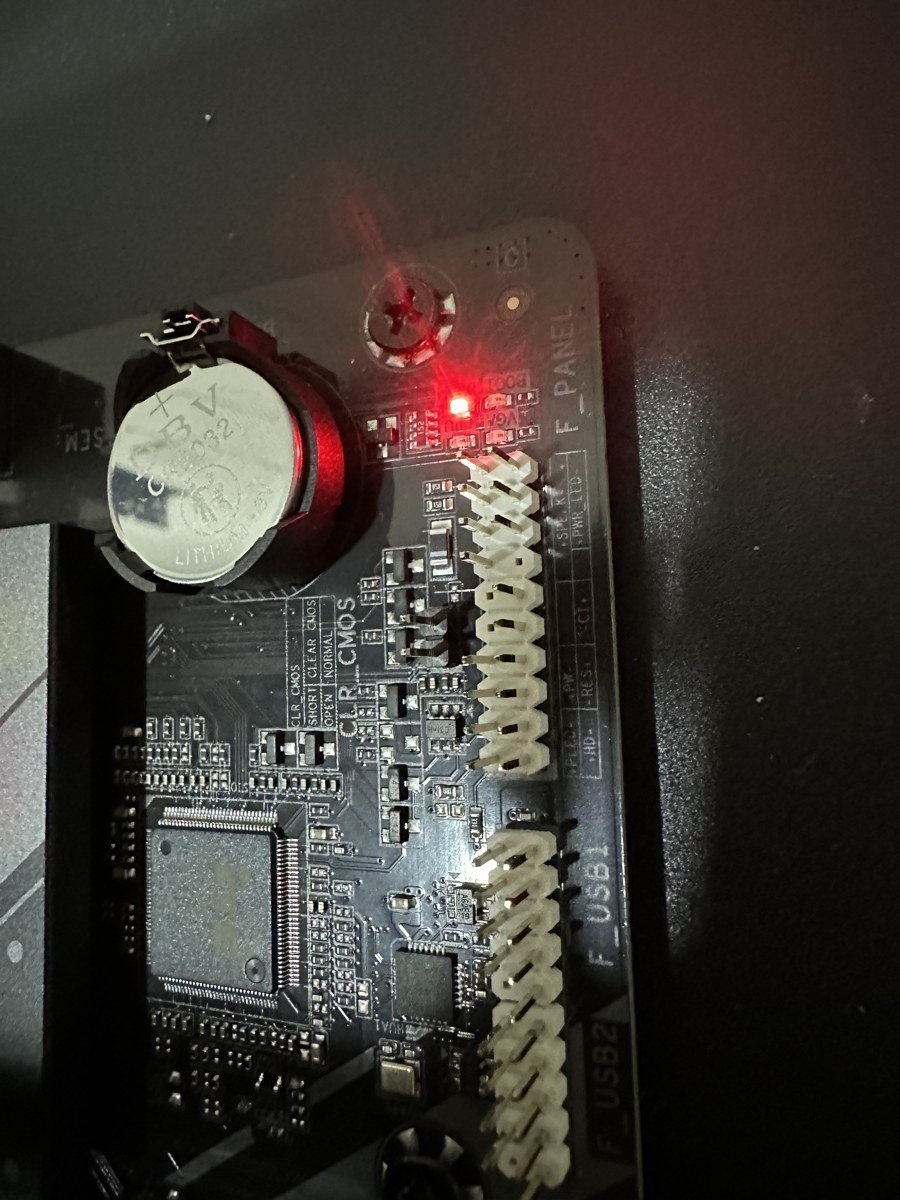
The CPU cooler didn’t clear the RAM in its intended orientation; rotating it worked but left the fan cable short of the header. And the “fully modular” 1000W PSU included exactly one PCIe power cable for a four-GPU build. Add a line item for cables, extensions, and adapters: my hidden costs (UPS, NAS, cables, misc) ended up around 28% of the final budget, which is why the initial “$2,500, this is doable” estimate became $5,528. Budget 40% over your component list. You’ll use it.
The framework that fixed the planning
The turning point in all this wasn’t a product recommendation, it was reversing the order of decisions. Spec-first planning - pick an impressive GPU, build around it - is how I nearly bought two wrong machines. Workload-first planning is four steps:
- List the actual workloads. Not “run AI models”: which parameter sizes, inference or training, what quantization is acceptable, how much context.
- Do the memory math. Roughly: 7B models want ~14GB for inference and ~20GB for fine-tuning; 30B wants ~60GB inference; 70B wants ~140GB at FP16 before you even discuss batch sizes. Memory is a threshold, not a slider: the model fits or it doesn’t, and a slower GPU with enough VRAM beats a faster GPU without it every time.
- Map workloads to hardware: only now do GPU model numbers enter the conversation. This is also where you read the slot map (see Mistake 3).
- Budget for reality: components + 40%, and verify your wall circuit. This build draws ~1,000W sustained, which is 56% of a 15A circuit - comfortable, but I calculated that late instead of first.
None of this is exotic. The entire point is sequence: every one of my mistakes came from deciding hardware before workload.
Seven months in production: the part the plan couldn’t predict
The 2025 version of this post would have ended at the framework. Here’s what actually happened after seven months of daily operation, including the part where the machine changed jobs.
It doesn’t run LLMs anymore. I benchmarked local serving properly - Ollama at 90.7 tok/s on 7B models, vLLM at 209.6 tok/s - and then the lab’s priorities moved. Today three GPUs spend their cycles training TFT and XGBoost models for a crypto trading-signal system, and the fourth serves inference for backtesting, paper trading, and live runs. The machine I speced for language-model inference became a gradient-boosting and time-series training rig. It’s better at that job than anything I could have rented at the price, which is either lucky or a point for uniform cards: four identical 16GB GPUs repartition into new roles without ceremony.
Thermals held; dust won. Open-frame air cooling handled seven months of sustained training load without an incident. The actual enemy was dust: an open frame is a room-scale air filter with $1,844 of GPUs as the filter medium. $50.45 of magnetic mesh filters draped over the frame solved it. Nobody’s build guide mentions this.
The NVMe “failure” was a scheduling bug. For a while the system threw NVMe errors that looked like dying hardware. The root cause: the nightly auto-backup at 1-2am colliding with overnight TFT training runs hammering the same drives. Disabling the backup during training windows ended the errors. Before you RMA a drive, check what your cron jobs are doing while you sleep.
The UPS paid for itself twice. Each GPU runs power-capped, so the PSU has never been stressed. But the house lost power twice in seven months, and both times the UPS carried the system through a clean shutdown mid-training. The $466 that felt hardest to justify on the parts list turned out to be the least negotiable. Total spend to date, with filters and the bifurcation riser: $5,638.79.
Would I build it again? No - and also yes
Here’s the uncomfortable hindsight. If I were building a machine purely to run local LLMs today, I wouldn’t build this. I’d buy an NVIDIA DGX Spark: no build days, less money than my final total, 128GB of unified memory against my 64GB of VRAM, chainable if you ever need to gang units together, and far better power efficiency.
Yes - unified memory, the thing I called Mistake 1. The difference is the workload, which is the whole thesis of this post arriving from the other direction. For serving big models to one user, capacity and convenience dominate. But for what this box actually does all day - training tree ensembles and temporal fusion transformers, then serving low-latency inference against live markets - dedicated VRAM on four independent cards is the right architecture, and the Spark isn’t. The workload-first framework didn’t just survive seven months of operation; it’s the only reason I can tell you precisely why each machine wins its own race.
The plan was wrong about almost every detail and right about the method. That’s about the best outcome a plan gets.
This box now powers the trading-signal research you’ll read about here: the backtests, the paper-trading gauntlet, and the experiments that don’t survive it. Research write-up, not financial advice. Subscribe if you want the full logs, failures included. That’s rather the point of this lab.
I'd like to claim this was foresight. It was chassis geometry.
- +Read the motherboard's lane-distribution table, not the CPU's lane count
- +Memory is a threshold, not a slider: a slower GPU with enough VRAM wins
- +Four identical cards repartition into new roles without ceremony
- +Budget components plus 40%; hidden costs were 28% of the final total
- ×The OS never enumerated the fourth GPU on the last x1 slot
- ×An RTX 3090 at 310mm and three slots wide simply didn't fit the frame
- ×First boot was a DRAM debug LED: the board's BIOS predated Zen 5
- ×NVMe errors that looked like dying hardware were a 1am backup colliding with training
Our LLM Polymarket bot was just reading the market price back to us
Aggregate Brier score 0.12. And it lost to the market in every single edge bucket. A postmortem of an LLM forecaster that turned out to be an expensive mirror.
무엇이 돌아갔고, 무엇이 출시됐고, 무엇이 죽었는지 — 숫자와 함께. 스레드도, 과장도 없습니다.